
Featured Canva Design
- The goal of this project is to create a Virtual Assistant (VA) by combining the OpenAI and Streamlit into a single data app framework to optimize the advantages of each, viz. AI VA = OpenAI/ChatGPT + Streamlit.
- The user should be able to launch this app from a browser/CMD.
- OpenAI’s ChatGPT: get instant answers, find creative inspiration, and learn something new.
- What is ChatGPT? ChatGPT is an AI chatbot that uses NLP to create humanlike conversational dialogue. The LLM can respond to questions and compose various written content, including articles, social media posts, essays, code and emails.
- How does ChatGPT work? ChatGPT works through its Generative Pre-trained Transformer (GPT), which uses specialized algorithms to find patterns within data sequences. ChatGPT uses the GPT-3 language model, a neural network ML model and the 3rd generation of GPT. The transformer pulls from a significant amount of data to formulate a response.
- You need two things to use ChatGPT: an OpenAI account and a web browser, as ChatGPT doesn’t currently offer a dedicated app. Visit chat.openai.com and sign up for an account using your email address, or a Google or Microsoft account. Once you’re logged in, you can finally use the AI chatbot!
- In this post, we will implement the following LLM algorithm
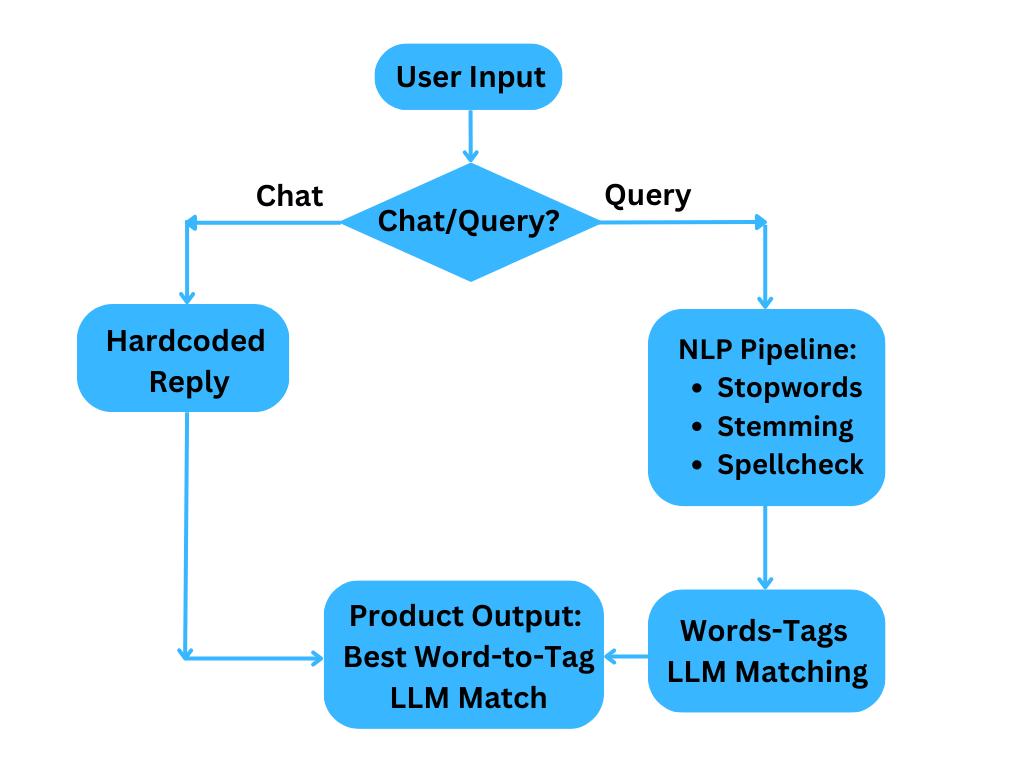
Generate Social Media Posts
Let’s utilize the power of GPT-3 to generate LinkedIn posts:
import streamlit as st
import openai
def get_openai_answer(post_content):
# Get API key
openai.api_key = “Your OpenAI API key”
# Set the model and compose the prompt
model_engine = "text-davinci-003"
prompt = f"Write a catchy linkedin post about {post_content}"

# Set the maximum number of tokens to generate in the response
max_tokens = 1024

# Generate a response
completion = openai.Completion.create(
    engine=model_engine,
    prompt=prompt,
    max_tokens=max_tokens,
    temperature=0.5,
    top_p=1,
    frequency_penalty=0,
    presence_penalty=0
)

# Get the response
answer = completion.choices[0].text

return answer
st.write(“Welcome to the LinkedIn post generator!”)
user_input = st.text_input(“Describe what you would like to have a LinkedIn post about: “)
if(st.button(“Generate LinkedIn post”)):
answer = get_openai_answer(user_input)
# Write answer
st.write(answer)
Text Q&A from CMD
Let’s implement the text Q&A session launched from CMD without invoking Streamlit:
import openai
openai.api_key = “Your OpenAI API key”
def generate_response(prompt):
model_engine = “text-davinci-003”
prompt = (f”{prompt}”)
completions = openai.Completion.create(
    engine=model_engine,
    prompt=prompt,
    max_tokens=1024,
    n=1,
    stop=None,
    temperature=0.5,
)

message = completions.choices[0].text
return message.strip()
prompt = input(“Enter your question: “)
response = generate_response(prompt)
print(response)
We need to run this code as follows:
python name.py
User AI Interaction Q&A
Let’s implement the user AI interaction Q&A session launched from CMD without Streamlit:
import openai
openai.api_key = “Your OpenAI API key”
def generate_response(prompt):
model_engine = “text-davinci-003”
prompt = (f”{prompt}”)
completions = openai.Completion.create(
    engine=model_engine,
    prompt=prompt,
    max_tokens=1024,
    n=1,
    stop=None,
    temperature=0.5,
)

message = completions.choices[0].text
return message.strip()
while True:
user_input = input(“User: “)
if user_input == “exit”:
break
response = generate_response(user_input)
print(“Chatbot:”, response)
AI Streaming Blogs
import streamlit as st
from streamlit_pills import pills
openai.api_key = “Your OpenAI API key”
st.subheader(“AI Assistant : Streamlit + OpenAI: stream argument“)
selected = pills(“”, [“NO Streaming”, “Streaming”], [“🎈”, “🌈”])
user_input = st.text_input(“You: “,placeholder = “Ask me anything …”, key=”input”)
if st.button(“Submit”, type=”primary”):
st.markdown(“—-“)
res_box = st.empty()
if selected == “Streaming”:
report = []
for resp in openai.Completion.create(model=’text-davinci-003′,
prompt=user_input,
max_tokens=120,
temperature = 0.5,
stream = True):
# join method to concatenate the elements of the list
# into a single string,
# then strip out any empty strings
report.append(resp.choices[0].text)
result = “”.join(report).strip()
result = result.replace(“\n”, “”)
res_box.markdown(f’{result}‘)
else:
    completions = openai.Completion.create(model='text-davinci-003',
                                        prompt=user_input,
                                        max_tokens=120,
                                        temperature = 0.5,
                                        stream = False)
    result = completions.choices[0].text

    res_box.write(result)
st.markdown(“—-“)
VA Chatbot via streamlit_chat
Let’s build our own VA chatbot using streamlit_chat (!pip install streamlit-chat):
openai.api_key = “Your OpenAI API key”
def generate_response(prompt):
completions = openai.Completion.create(
engine = “text-davinci-003”,
prompt = prompt,
max_tokens = 1024,
n = 1,
stop = None,
temperature=0.5,
)
message = completions.choices[0].text
return message
st.title(“chatBot : Streamlit + openAI”)
if ‘generated’ not in st.session_state:
st.session_state[‘generated’] = []
if ‘past’ not in st.session_state:
st.session_state[‘past’] = []
def get_text():
input_text = st.text_input(“You: “,”Hello, how are you?”, key=”input”)
return input_text
user_input = get_text()
if user_input:
output = generate_response(user_input)
# store the output
st.session_state.past.append(user_input)
st.session_state.generated.append(output)
if st.session_state[‘generated’]:
for i in range(len(st.session_state['generated'])-1, -1, -1):
    message(st.session_state["generated"][i], key=str(i))
    message(st.session_state['past'][i], is_user=True, key=str(i) + '_user')
Chatting with ChatGPT
Finally, let’s build a ChatGPT web app with Streamlit and OpenAI:
import streamlit
import openai
import streamlit as st
st.title(“Chatting with ChatGPT”)
st.sidebar.header(“Instructions”)
st.sidebar.info(
”’This is a web application that allows you to interact with
the OpenAI API’s implementation of the ChatGPT model.
Enter a query in the text box and press enter to receive
a response from the ChatGPT
”’
)
model_engine = “text-davinci-003”
openai.api_key = “Your OpenAI API key”
def main():
”’
This function gets the user input, pass it to ChatGPT function and
displays the response
”’
# Get user input
user_query = st.text_input(“Enter query here, to exit enter :q”, “what is Python?”)
if user_query != “:q” or user_query != “”:
# Pass the query to the ChatGPT function
response = ChatGPT(user_query)
return st.write(f”{user_query} {response}”)
def ChatGPT(user_query):
”’
This function uses the OpenAI API to generate a response to the given
user_query using the ChatGPT model
”’
# Use the OpenAI API to generate a response
completion = openai.Completion.create(
engine = model_engine,
prompt = user_query,
max_tokens = 1024,
n = 1,
temperature = 0.5,
)
response = completion.choices[0].text
return response
main()
We launch the app by executing the run command from CMD
streamlit run script_name.py
GitHub Repo
Explore More
- An Interactive GPT Index and DeepLake Interface – 1. Amazon Financial Statements
- Advanced NLP Analysis & Stock Impact of ChatGPT-Related Tweets Q1’23
- Build A Simple NLP/NLTK Chatbot
References
https://blog.devgenius.io/building-a-chatgpt-web-app-with-streamlit-and-openai-a-step-by-step-tutorial-1cd57a57290b
https://medium.com/@avra42/chatgpt-build-this-data-science-web-app-using-streamlit-python-25acca3cecd4
https://blog.devgenius.io/building-a-chatgpt-web-app-with-streamlit-and-openai-a-step-by-step-tutorial-1cd57a57290b
https://medium.com/@avra42/build-your-own-chatbot-with-openai-gpt-3-and-streamlit-6f1330876846
https://www.kaggle.com/code/amirmotefaker/create-your-own-chatgpt
https://www.kaggle.com/code/shrishtivaish/llm-chatbot/notebook
https://medium.com/@alexandre.tkint/revolutionize-your-chatbot-game-with-the-chat-gpt-api-and-python-get-started-in-just-3-minutes-8b588dacf48f
https://beebom.com/cool-things-chatgpt/
https://platform.openai.com/overview
https://platform.openai.com/docs/quickstart/build-your-application
https://dev.to/dani_avila7/youtbe-gpt-start-a-chat-with-a-video-3ona
https://dragonforest.in/chat-gpt-3-web-app-with-streamlit/
https://blog.streamlit.io/using-chatgpt-to-build-a-kedro-ml-pipeline/#question-1
Embed Socials


Make a one-time donation
Make a monthly donation
Make a yearly donation
Choose an amount
Or enter a custom amount
Your contribution is appreciated.
Your contribution is appreciated.
Your contribution is appreciated.


Leave a Reply